Managing users and permissions in WordPress: why it matters so much
In the digital age, keeping data secure and managing websites efficiently is more essential than ever. One of the most important ways to protect a WordPress site is to manage users and permissions properly. It lets site owners control access to the site’s content and features precisely and safely.
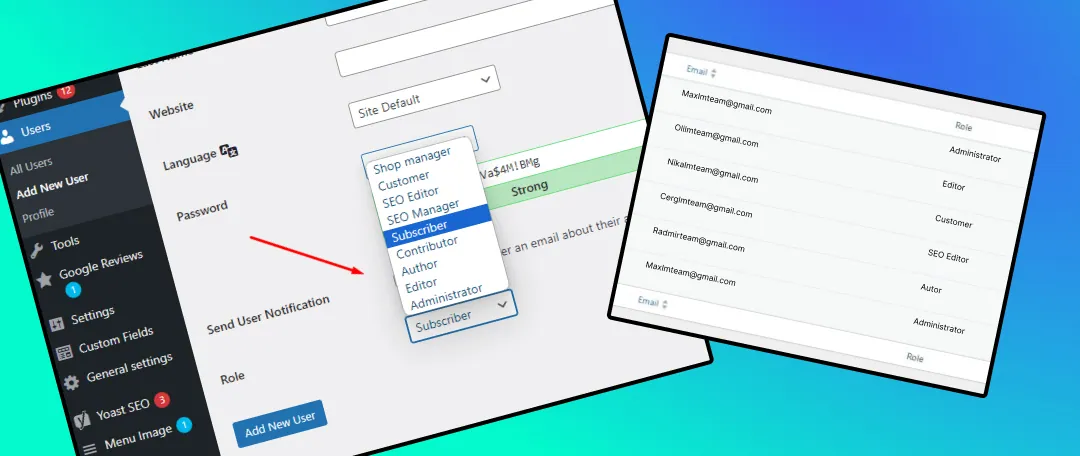
WordPress user roles
- Administrator: Has full permissions on the site, including adding, editing and deleting content, installing and managing plugins and themes, and managing all other users.
- Editor: Can add, edit and delete any post or page on the site, and manage categories, tags and comments.
- Author: Can write, edit and publish their own posts.
- Contributor: Can write and edit posts but cannot publish them. Their posts must be reviewed and approved.
- Subscriber: Can manage only their own profile.
Why user and permission management matters
Security:
- Protecting data: Managing user permissions correctly prevents unauthorized access to sensitive information.
- Preventing malicious actions: Limiting access for different users reduces the risk of malicious activity.
More efficient work:
- Clear roles: Make work more efficient and better organized.
- Fewer mistakes: Restricting permissions lowers the chance of errors.
Order and organization:
- Activity logs: Make it possible to track and document actions taken on the site.
- Content protection: Ensures that only authorized users can edit or delete content.
Whether you manage your site yourself or rely on a website maintenance company to handle permissions, make sure the administrator role is not the default for every user, and is given only to people who actually need it. For more questions or a consultation, feel free to reach out through this link.